
Changelog
Changelog
New updates & improvements to Innovation Within.
New updates & improvements to Innovation Within.
Dec 10, 2025
Synthetic Interview Generation
We’ve introduced Synthetic Interview Generation to help teams explore ideas, test assumptions, and simulate customer feedback when real interviews are limited or not yet available. This feature uses AI to generate realistic interview conversations based on your business context, allowing you to continue learning and refining your model without blocking progress.
Synthetic interviews act as a complementary research tool—helping you think through scenarios, uncover potential insights, and prepare better for real customer conversations.
New Features:
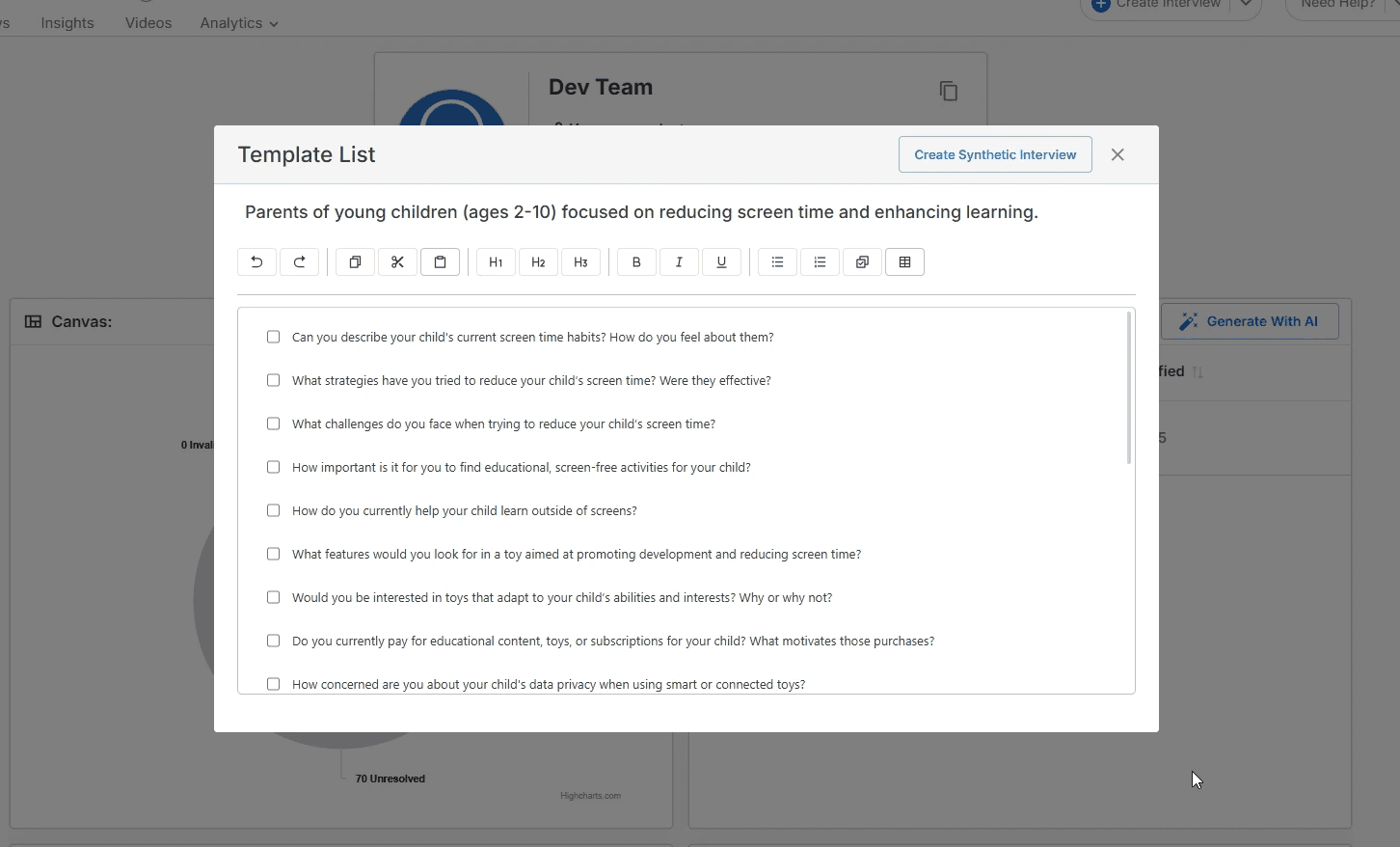
AI-Generated Interview Conversations: Generate realistic, structured interview transcripts based on your idea, canvas, or hypotheses.
Support Early-Stage Exploration: Useful when real interviews are not yet available, helping teams explore assumptions and potential customer perspectives.
Insight-Ready Output: Synthetic interviews can be analyzed just like real ones, enabling insight generation, tagging, and hypothesis evaluation.
Team-Controlled Access: Availability can be managed at the team level to ensure synthetic data is used intentionally and appropriately.
Dec 10, 2025
Synthetic Interview Generation
We’ve introduced Synthetic Interview Generation to help teams explore ideas, test assumptions, and simulate customer feedback when real interviews are limited or not yet available. This feature uses AI to generate realistic interview conversations based on your business context, allowing you to continue learning and refining your model without blocking progress.
Synthetic interviews act as a complementary research tool—helping you think through scenarios, uncover potential insights, and prepare better for real customer conversations.
New Features:
AI-Generated Interview Conversations: Generate realistic, structured interview transcripts based on your idea, canvas, or hypotheses.
Support Early-Stage Exploration: Useful when real interviews are not yet available, helping teams explore assumptions and potential customer perspectives.
Insight-Ready Output: Synthetic interviews can be analyzed just like real ones, enabling insight generation, tagging, and hypothesis evaluation.
Team-Controlled Access: Availability can be managed at the team level to ensure synthetic data is used intentionally and appropriately.
Nov 18, 2025
AI Insight Auto-Tagging
We’ve added a new AI analysis phase that automatically assigns relevant tags to insights as they are generated. This enhancement removes the manual effort of tagging and ensures insights are consistently categorized, making it easier to organize, filter, and prioritize what matters most.
By intelligently understanding the context of each insight, the platform now helps you maintain a cleaner, more structured insight system—without extra work.
New Features:
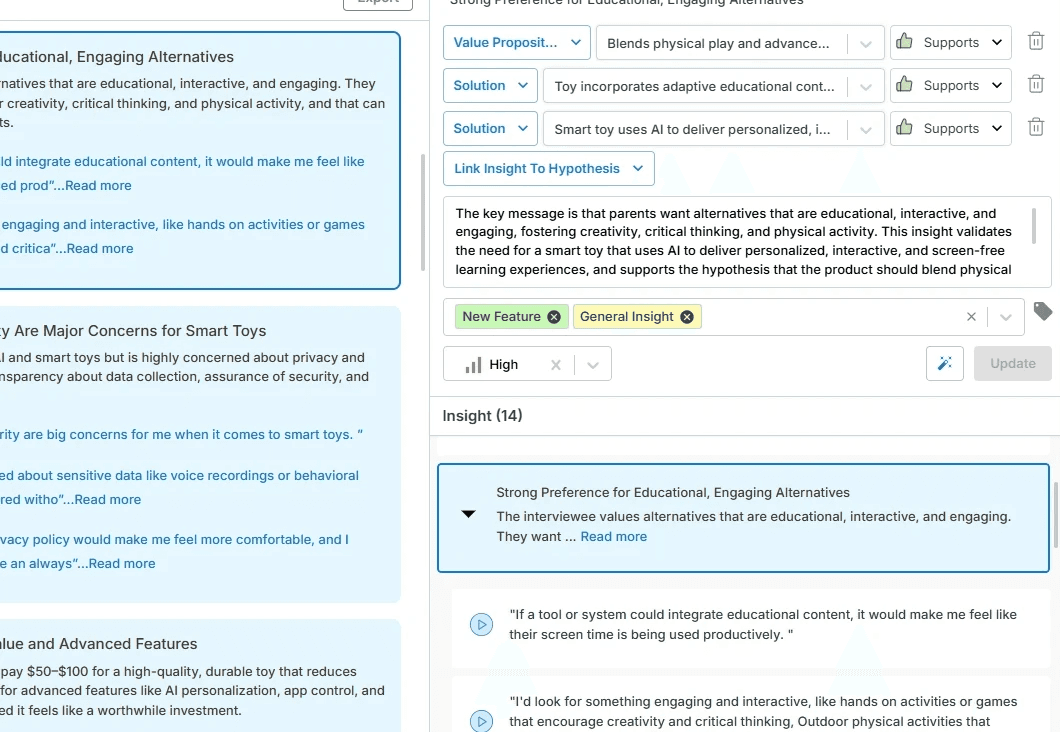
Automatic Insight Tagging: AI now assigns meaningful tags to insights during analysis, based on content, context, and relevance.
New Analysis Phase: Auto-tagging is built directly into the AI pipeline, ensuring tags are generated alongside insights—not as an afterthought.
Improved Insight Organization: Tagged insights are easier to filter, group, and review across interviews and canvases.
Reduced Manual Effort: Spend less time managing tags and more time interpreting insights and making decisions.
Nov 18, 2025
AI Insight Auto-Tagging
We’ve added a new AI analysis phase that automatically assigns relevant tags to insights as they are generated. This enhancement removes the manual effort of tagging and ensures insights are consistently categorized, making it easier to organize, filter, and prioritize what matters most.
By intelligently understanding the context of each insight, the platform now helps you maintain a cleaner, more structured insight system—without extra work.
New Features:
Automatic Insight Tagging: AI now assigns meaningful tags to insights during analysis, based on content, context, and relevance.
New Analysis Phase: Auto-tagging is built directly into the AI pipeline, ensuring tags are generated alongside insights—not as an afterthought.
Improved Insight Organization: Tagged insights are easier to filter, group, and review across interviews and canvases.
Reduced Manual Effort: Spend less time managing tags and more time interpreting insights and making decisions.
Nov 15, 2025
Settings Panel for Notifications & Recording Preferences
We’ve introduced a dedicated Settings Panel to give you more control over how Innovation Within works for you. This new panel centralizes key preferences related to meetings, recordings, and notifications—making it easier to customize your workflow without digging through the platform.
With clearer options and a focused layout, you can now decide how interviews are recorded and when you want to be notified, all from one place.
New Features:
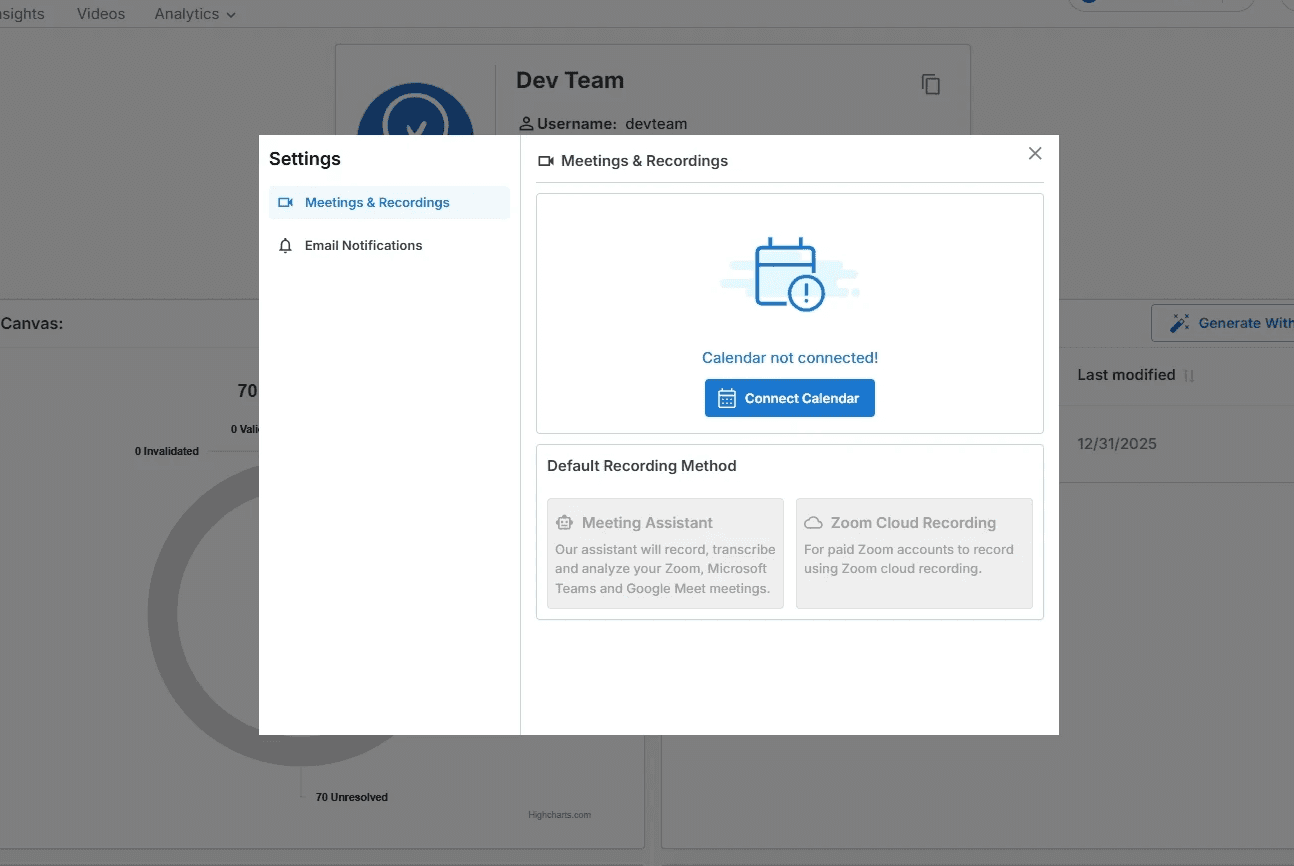
Meetings & Recordings Settings: Connect your calendar, choose your default recording method (Meeting Assistant or Zoom Cloud Recording), and manage how interviews are captured.
Email Notification Preferences: Control which emails you receive, including canvas activity updates and insight feedback notifications.
Centralized Settings Experience: All related preferences are now grouped into a single, easy-to-access panel for faster configuration and better clarity.
Cleaner, Guided UI: A redesigned settings layout helps you understand available options at a glance, reducing setup confusion for new and existing users.
Nov 15, 2025
Settings Panel for Notifications & Recording Preferences
We’ve introduced a dedicated Settings Panel to give you more control over how Innovation Within works for you. This new panel centralizes key preferences related to meetings, recordings, and notifications—making it easier to customize your workflow without digging through the platform.
With clearer options and a focused layout, you can now decide how interviews are recorded and when you want to be notified, all from one place.
New Features:
Meetings & Recordings Settings: Connect your calendar, choose your default recording method (Meeting Assistant or Zoom Cloud Recording), and manage how interviews are captured.
Email Notification Preferences: Control which emails you receive, including canvas activity updates and insight feedback notifications.
Centralized Settings Experience: All related preferences are now grouped into a single, easy-to-access panel for faster configuration and better clarity.
Cleaner, Guided UI: A redesigned settings layout helps you understand available options at a glance, reducing setup confusion for new and existing users.
Nov 10, 2025
Custom Canvas Integration
We’ve introduced Custom Canvas Integration to give teams full flexibility beyond the standard Business Model Canvas. Admin and Cohort Admin users can now request and use custom-designed canvases tailored to their unique frameworks, methodologies, or internal models.
This update allows Innovation Within to support diverse innovation workflows—whether you’re working with industry-specific canvases, proprietary models, or entirely new ways of structuring ideas.
New Features:
User-Defined Canvas Structures: Admin and Cohort Admin users can request custom canvas designs based on their own segment definitions, layouts, and terminology.
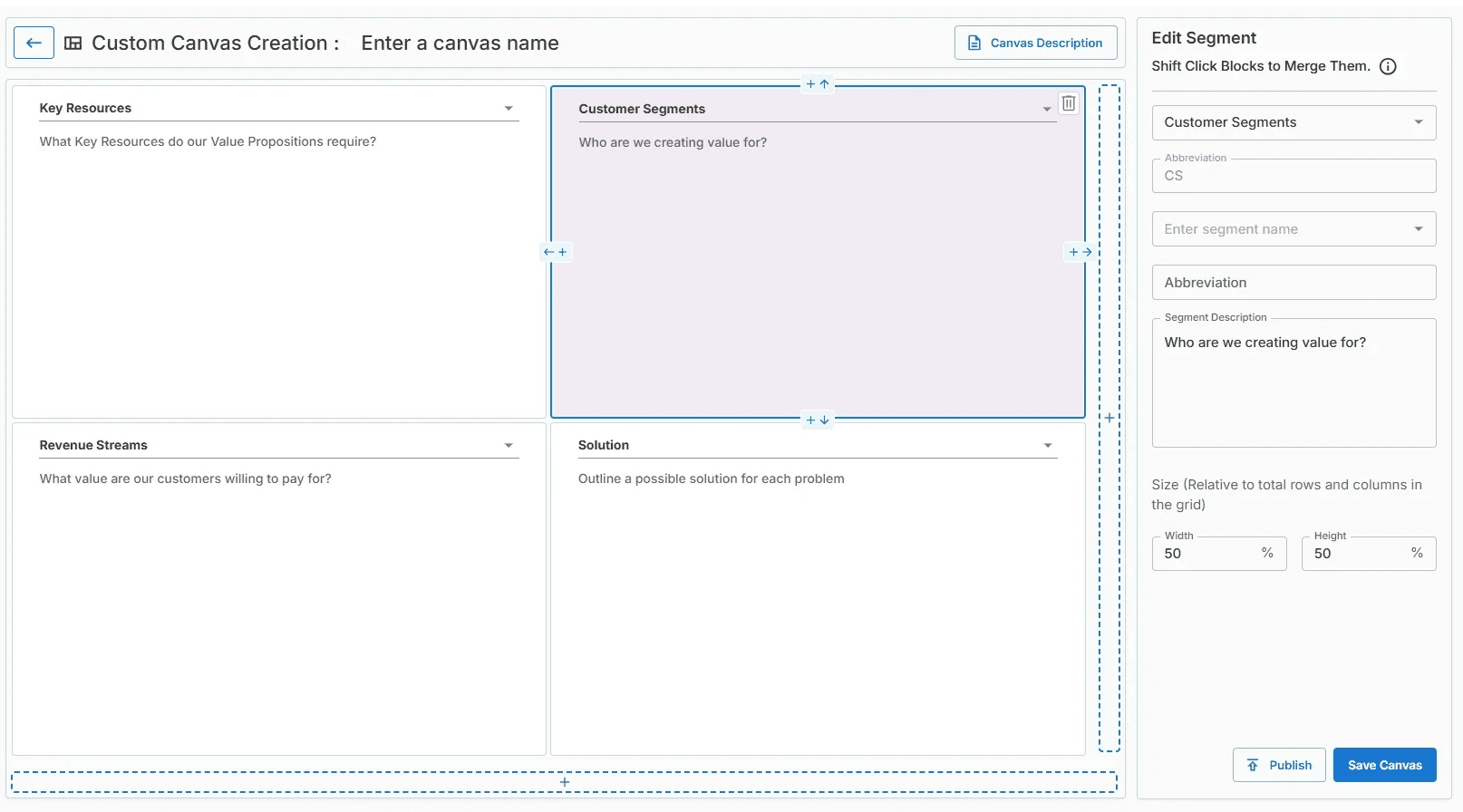
Flexible Segment Configuration: Custom canvases support configurable segment names, descriptions, sizes, and positions—adapting fully to your chosen framework.
Beyond Default Templates: Move past the standard Business Model Canvas and work with canvases designed specifically for your organization’s innovation process.
Seamless Canvas Editing & Publishing: Custom canvases can be created, edited, saved, and published just like built-in canvases, ensuring a consistent experience across the platform.
Nov 10, 2025
Custom Canvas Integration
We’ve introduced Custom Canvas Integration to give teams full flexibility beyond the standard Business Model Canvas. Admin and Cohort Admin users can now request and use custom-designed canvases tailored to their unique frameworks, methodologies, or internal models.
This update allows Innovation Within to support diverse innovation workflows—whether you’re working with industry-specific canvases, proprietary models, or entirely new ways of structuring ideas.
New Features:
User-Defined Canvas Structures: Admin and Cohort Admin users can request custom canvas designs based on their own segment definitions, layouts, and terminology.
Flexible Segment Configuration: Custom canvases support configurable segment names, descriptions, sizes, and positions—adapting fully to your chosen framework.
Beyond Default Templates: Move past the standard Business Model Canvas and work with canvases designed specifically for your organization’s innovation process.
Seamless Canvas Editing & Publishing: Custom canvases can be created, edited, saved, and published just like built-in canvases, ensuring a consistent experience across the platform.
Oct 30, 2025
Cohort Admin Panel
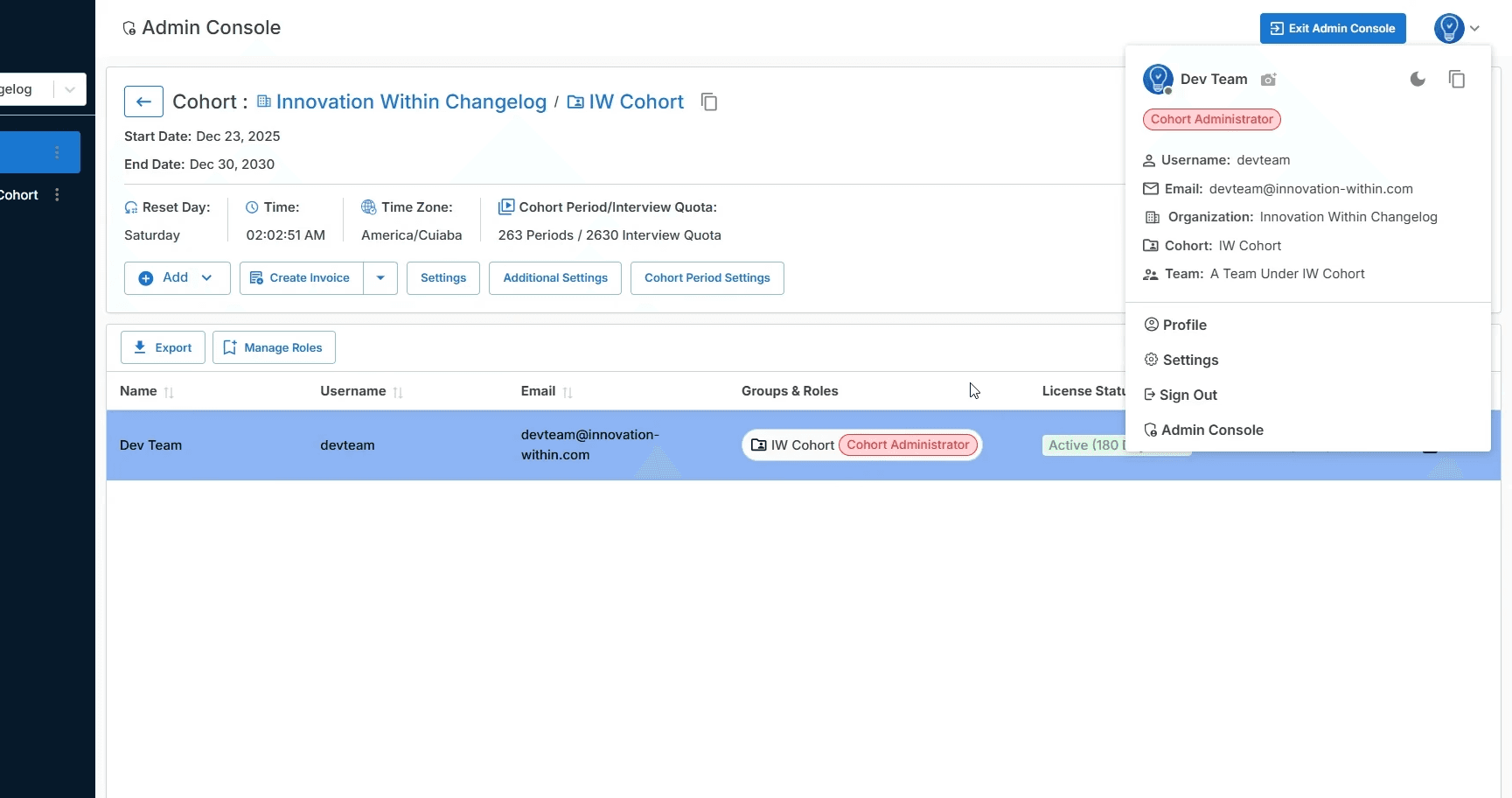
We’ve introduced a dedicated Cohort Admin Panel to give cohort administrators full control over teams, access, and operational settings within their cohort. This new panel centralizes management tools that were previously scattered or unavailable—making it easier to run programs, manage permissions, and oversee usage at scale.
With this update, cohort admins can confidently manage their cohort without relying on platform-wide administrators.
New Features:
Dedicated Cohort Administration Console: Cohort Admins now have access to a centralized panel to manage cohort-level settings, users, and configurations.
Role & Access Management: Assign and manage roles within a cohort, including Cohort Administrator permissions, ensuring clear ownership and governance.
Cohort Settings & Controls: Configure cohort-specific settings such as access permissions, visibility rules, and feature availability for teams.
Interview Goal & Period Management: View and manage interview goals, reset periods, and cohort timelines directly from the admin interface.
Chat & Collaboration Controls: Enable or disable cohort-level chat features, including instructor chat, feedback chat, and general communication channels.
Billing & License Visibility: Track license status, usage duration, and cohort-level activity without leaving the admin panel.
Oct 30, 2025
Cohort Admin Panel
We’ve introduced a dedicated Cohort Admin Panel to give cohort administrators full control over teams, access, and operational settings within their cohort. This new panel centralizes management tools that were previously scattered or unavailable—making it easier to run programs, manage permissions, and oversee usage at scale.
With this update, cohort admins can confidently manage their cohort without relying on platform-wide administrators.
New Features:
Dedicated Cohort Administration Console: Cohort Admins now have access to a centralized panel to manage cohort-level settings, users, and configurations.
Role & Access Management: Assign and manage roles within a cohort, including Cohort Administrator permissions, ensuring clear ownership and governance.
Cohort Settings & Controls: Configure cohort-specific settings such as access permissions, visibility rules, and feature availability for teams.
Interview Goal & Period Management: View and manage interview goals, reset periods, and cohort timelines directly from the admin interface.
Chat & Collaboration Controls: Enable or disable cohort-level chat features, including instructor chat, feedback chat, and general communication channels.
Billing & License Visibility: Track license status, usage duration, and cohort-level activity without leaving the admin panel.
Oct 20, 2025
Modern Authentication & Login Experience
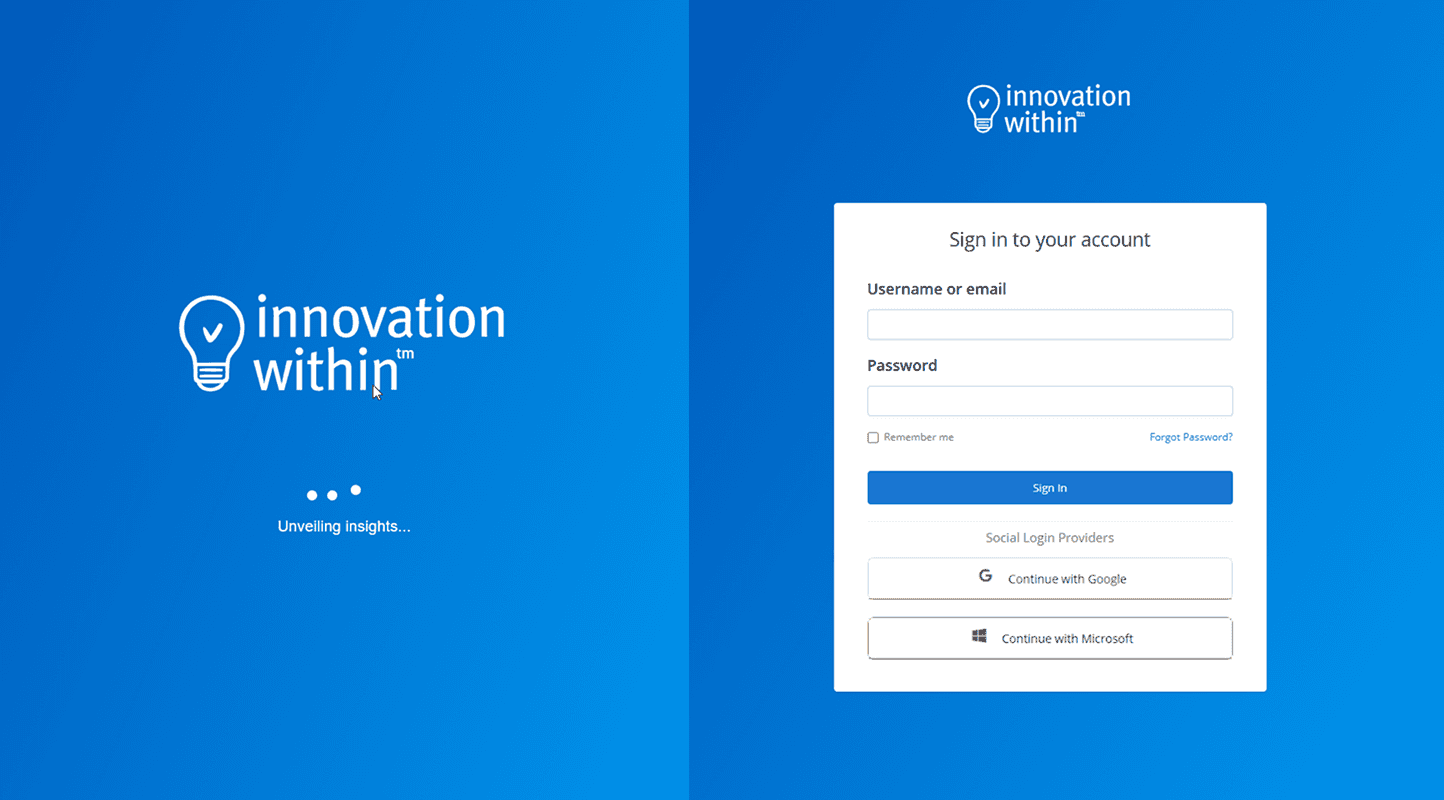
We’ve upgraded the authentication experience to make signing in more secure, reliable, and user-friendly. This update introduces a newer, more robust version of our authentication system along with a redesigned login interface that feels faster and clearer from the very first interaction.
Behind the scenes, security has been strengthened while keeping the experience simple and familiar for your team.
New Features:
Upgraded Authentication System: We’ve moved to a newer, more secure version of Keycloak, improving reliability, performance, and long-term security.
Redesigned Login Interface: A cleaner, modern login UI with improved layout and clarity—making it easier to sign in without friction.
Improved Session Handling: More stable login sessions reduce unexpected sign-outs and improve overall trust in the platform.
Future-Ready Foundation: This upgrade prepares the platform for upcoming authentication features and integrations while keeping your data protected.
Oct 20, 2025
Modern Authentication & Login Experience
We’ve upgraded the authentication experience to make signing in more secure, reliable, and user-friendly. This update introduces a newer, more robust version of our authentication system along with a redesigned login interface that feels faster and clearer from the very first interaction.
Behind the scenes, security has been strengthened while keeping the experience simple and familiar for your team.
New Features:
Upgraded Authentication System: We’ve moved to a newer, more secure version of Keycloak, improving reliability, performance, and long-term security.
Redesigned Login Interface: A cleaner, modern login UI with improved layout and clarity—making it easier to sign in without friction.
Improved Session Handling: More stable login sessions reduce unexpected sign-outs and improve overall trust in the platform.
Future-Ready Foundation: This upgrade prepares the platform for upcoming authentication features and integrations while keeping your data protected.
Oct 10, 2025
Smarter Hypothesis Review
New Features:
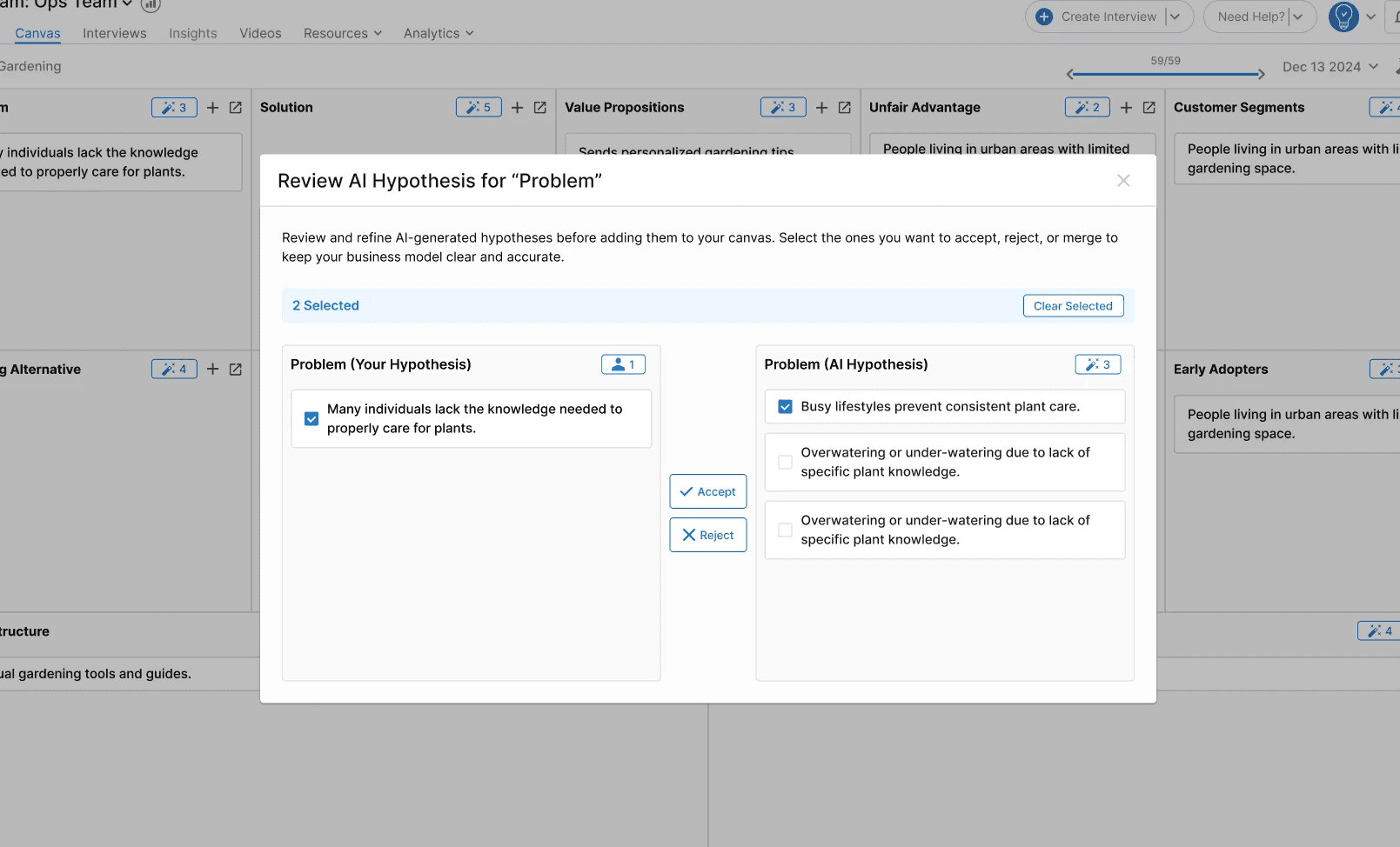
Guided Hypothesis Review: Gain full control over your hypotheses with an organized review process that keeps your canvas focused and clutter-free.
Select or Accept All: Whether you want to move fast or fine-tune every detail, you can now accept all hypotheses in one click or selectively choose the ones most relevant to your business idea.
Oct 10, 2025
Smarter Hypothesis Review
New Features:
Guided Hypothesis Review: Gain full control over your hypotheses with an organized review process that keeps your canvas focused and clutter-free.
Select or Accept All: Whether you want to move fast or fine-tune every detail, you can now accept all hypotheses in one click or selectively choose the ones most relevant to your business idea.
Sep 15, 2025
Dark Mode (Platform-Wide)
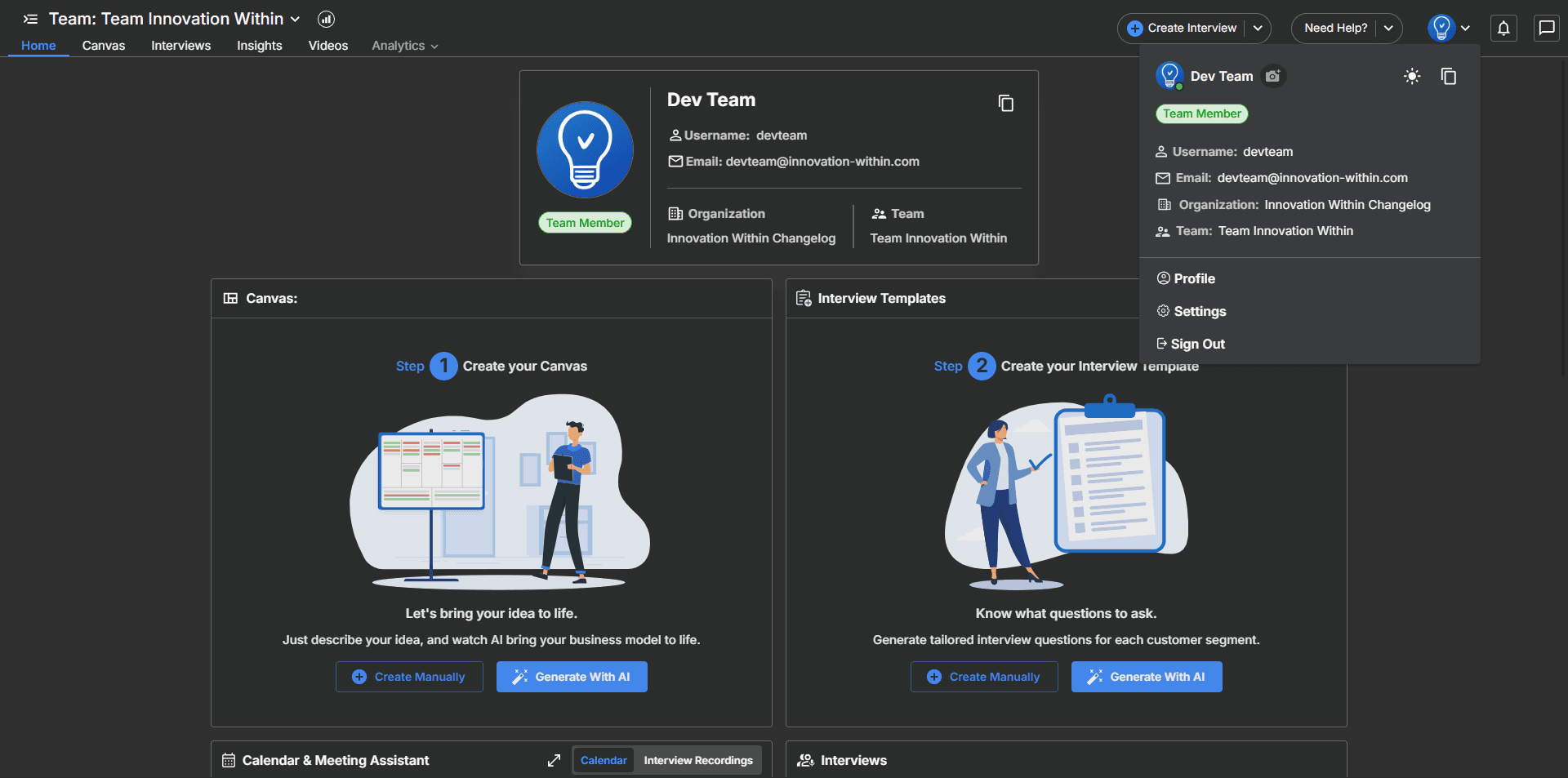
We’re excited to introduce Dark Mode across the entire Innovation Within platform. Designed for comfort, clarity, and long working sessions, the new Dark Mode brings a modern visual experience that reduces eye strain and lets you stay focused—day or night. Whether you're reviewing canvases, analyzing interviews, or exploring insights, every screen now adapts beautifully to a low-light environment.
New Features:
Full Platform Dark Theme: Every page—from Canvas to Interviews, Insights, Videos, Resources, and Admin—now supports a seamless dark viewing experience.
Redesigned UI Elements: Buttons, cards, tables, modals, dropdowns, and icons have all been updated to match the new dark palette for maximum readability.
Smart Theme Styling: Colors, contrast, and typography adjust automatically for improved legibility without overwhelming brightness.
Updated Home & Navigation: The dashboard, top bar, and sidebar now all support Dark Mode with a clean, unified visual identity.
Consistent Experience Across Features: Interview templates, canvas entries, insights, meeting assistant panels, and settings pages all adapt smoothly to the theme.
Sep 15, 2025
Dark Mode (Platform-Wide)
We’re excited to introduce Dark Mode across the entire Innovation Within platform. Designed for comfort, clarity, and long working sessions, the new Dark Mode brings a modern visual experience that reduces eye strain and lets you stay focused—day or night. Whether you're reviewing canvases, analyzing interviews, or exploring insights, every screen now adapts beautifully to a low-light environment.
New Features:
Full Platform Dark Theme: Every page—from Canvas to Interviews, Insights, Videos, Resources, and Admin—now supports a seamless dark viewing experience.
Redesigned UI Elements: Buttons, cards, tables, modals, dropdowns, and icons have all been updated to match the new dark palette for maximum readability.
Smart Theme Styling: Colors, contrast, and typography adjust automatically for improved legibility without overwhelming brightness.
Updated Home & Navigation: The dashboard, top bar, and sidebar now all support Dark Mode with a clean, unified visual identity.
Consistent Experience Across Features: Interview templates, canvas entries, insights, meeting assistant panels, and settings pages all adapt smoothly to the theme.
Aug 26, 2025
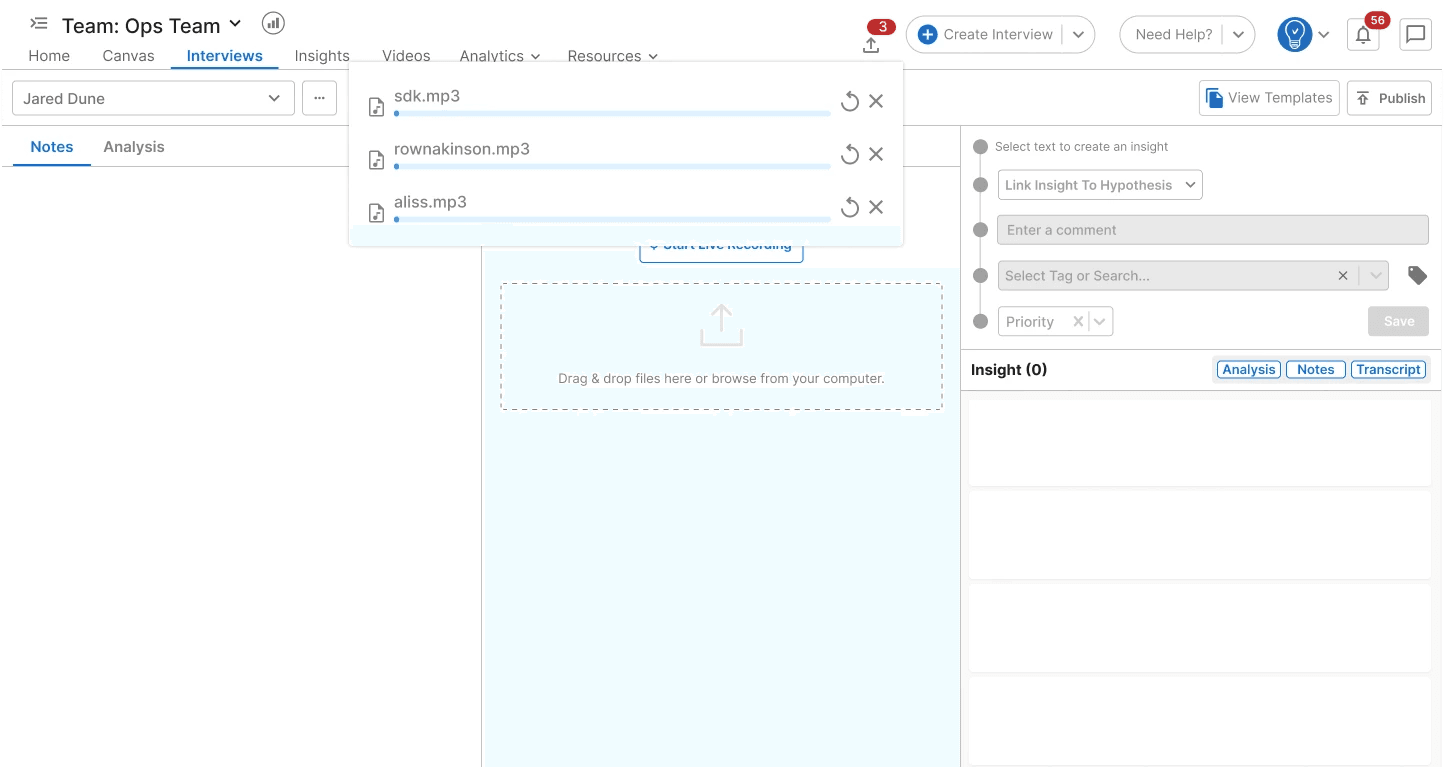
Improved Media Upload Performance
Uploading large interview files is now significantly faster and more reliable. We’ve optimized the entire media upload pipeline to handle bigger files with smoother performance, fewer interruptions, and improved processing stability. Whether you’re uploading long customer conversations or higher-quality audio, the experience is now quicker and more dependable.
New Features:
Faster Large File Uploads: Optimized upload handling dramatically reduces waiting time for bigger audio files.
Improved Stability for Long Interviews: Uploads are more resilient, preventing failures during long or high-quality recordings.
Smarter Retry & Recovery Logic: Automatic fallback behavior ensures progress isn’t lost even if a connection drops mid-upload.
Better Progress Feedback: Upload status updates are more accurate, giving you clearer visibility during long waits.
Aug 26, 2025
Improved Media Upload Performance
Uploading large interview files is now significantly faster and more reliable. We’ve optimized the entire media upload pipeline to handle bigger files with smoother performance, fewer interruptions, and improved processing stability. Whether you’re uploading long customer conversations or higher-quality audio, the experience is now quicker and more dependable.
New Features:
Faster Large File Uploads: Optimized upload handling dramatically reduces waiting time for bigger audio files.
Improved Stability for Long Interviews: Uploads are more resilient, preventing failures during long or high-quality recordings.
Smarter Retry & Recovery Logic: Automatic fallback behavior ensures progress isn’t lost even if a connection drops mid-upload.
Better Progress Feedback: Upload status updates are more accurate, giving you clearer visibility during long waits.
Aug 21, 2025
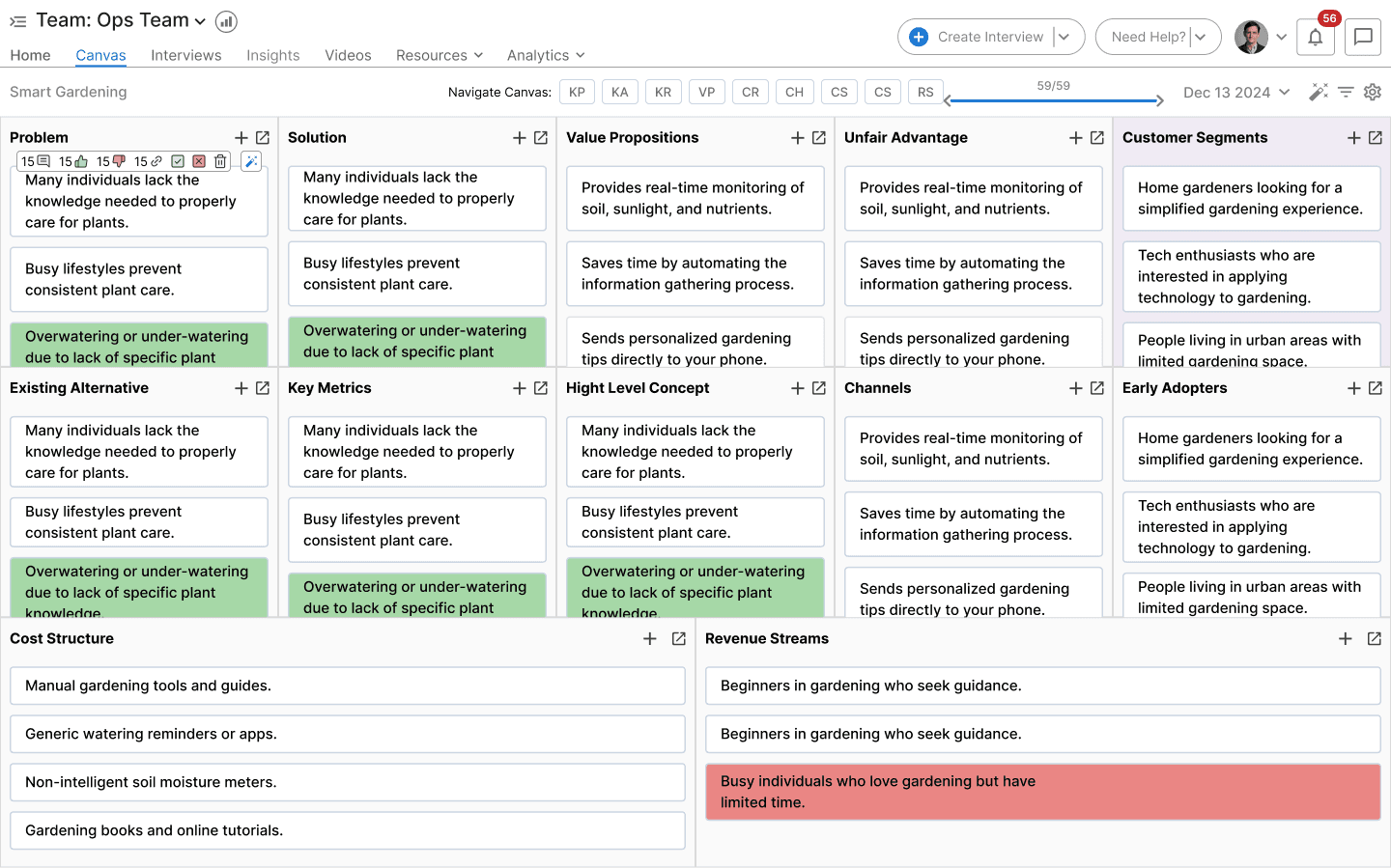
Canvas UI Visual Refresh
We’ve updated the Business Model Canvas with a cleaner, more modern look designed to help you interpret your insights faster and stay visually organized as your canvas grows. The refreshed styling introduces clearer color cues, improved readability, and a more polished layout for segments and hypotheses.
These enhancements make it easier to scan your canvas at a glance, spot patterns, and confidently refine your business model with visual clarity.
New Features:
Improved Segment Colors: Each canvas segment now uses a refined color palette that improves distinction and reduces visual noise, making the canvas easier to navigate.
Enhanced Hypothesis Highlighting: Supporting, contradicting, and AI-generated hypotheses now stand out more clearly with updated color treatments for faster interpretation.
Cleaned-Up Card Layouts: Hypothesis and segment cards feature improved spacing, padding, and alignment—creating a sharper, more readable canvas.
Consistent Visual Language: All elements now follow updated design guidelines from across the platform, offering a more unified experience from segments to insights.
Aug 21, 2025
Canvas UI Visual Refresh
We’ve updated the Business Model Canvas with a cleaner, more modern look designed to help you interpret your insights faster and stay visually organized as your canvas grows. The refreshed styling introduces clearer color cues, improved readability, and a more polished layout for segments and hypotheses.
These enhancements make it easier to scan your canvas at a glance, spot patterns, and confidently refine your business model with visual clarity.
New Features:
Improved Segment Colors: Each canvas segment now uses a refined color palette that improves distinction and reduces visual noise, making the canvas easier to navigate.
Enhanced Hypothesis Highlighting: Supporting, contradicting, and AI-generated hypotheses now stand out more clearly with updated color treatments for faster interpretation.
Cleaned-Up Card Layouts: Hypothesis and segment cards feature improved spacing, padding, and alignment—creating a sharper, more readable canvas.
Consistent Visual Language: All elements now follow updated design guidelines from across the platform, offering a more unified experience from segments to insights.
Aug 20, 2025
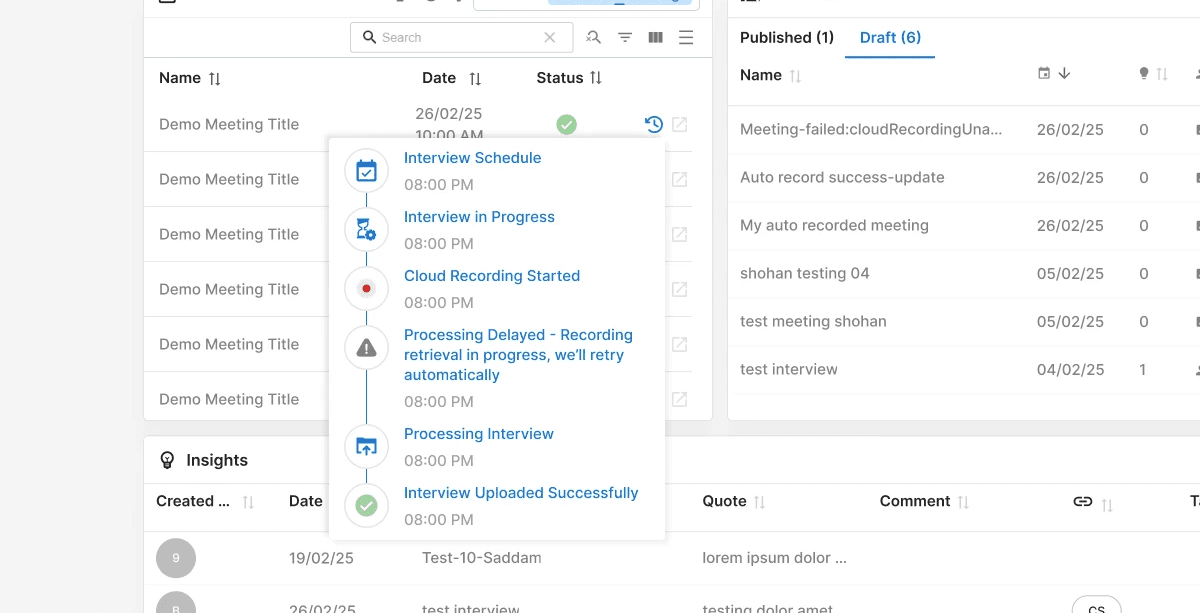
Meeting Status Log for Cloud Recordings
Tracking your Zoom-based customer interviews is now clearer and more reliable than ever. With the new Meeting Status Log, you can follow every stage of your cloud-recorded interview—from scheduling to recording to AI processing—all in one streamlined timeline. This makes it easy to understand what’s happening behind the scenes and quickly identify if anything needs your attention.
This update provides full transparency into the meeting lifecycle, helping teams stay informed without switching tabs or guessing where a recording stands.
New Features:
Full Meeting Timeline: View a step-by-step history of each interview, including scheduling, joining, recording start, processing delays, and AI analysis.
Unified Status Indicators: Clear visual icons and color-coded markers instantly show whether a meeting is in progress, completed, or delayed.
Cloud Recording Tracking: See exactly when a Zoom recording started, processed, or encountered retrieval delays—ensuring better visibility when using automated recording workflows.
Integrated With Interview List: Access meeting logs directly from your interview list, making it simple to troubleshoot issues or verify recording completion.
Aug 20, 2025
Meeting Status Log for Cloud Recordings
Tracking your Zoom-based customer interviews is now clearer and more reliable than ever. With the new Meeting Status Log, you can follow every stage of your cloud-recorded interview—from scheduling to recording to AI processing—all in one streamlined timeline. This makes it easy to understand what’s happening behind the scenes and quickly identify if anything needs your attention.
This update provides full transparency into the meeting lifecycle, helping teams stay informed without switching tabs or guessing where a recording stands.
New Features:
Full Meeting Timeline: View a step-by-step history of each interview, including scheduling, joining, recording start, processing delays, and AI analysis.
Unified Status Indicators: Clear visual icons and color-coded markers instantly show whether a meeting is in progress, completed, or delayed.
Cloud Recording Tracking: See exactly when a Zoom recording started, processed, or encountered retrieval delays—ensuring better visibility when using automated recording workflows.
Integrated With Interview List: Access meeting logs directly from your interview list, making it simple to troubleshoot issues or verify recording completion.
Aug 18, 2025
AI-Enhanced Business Idea
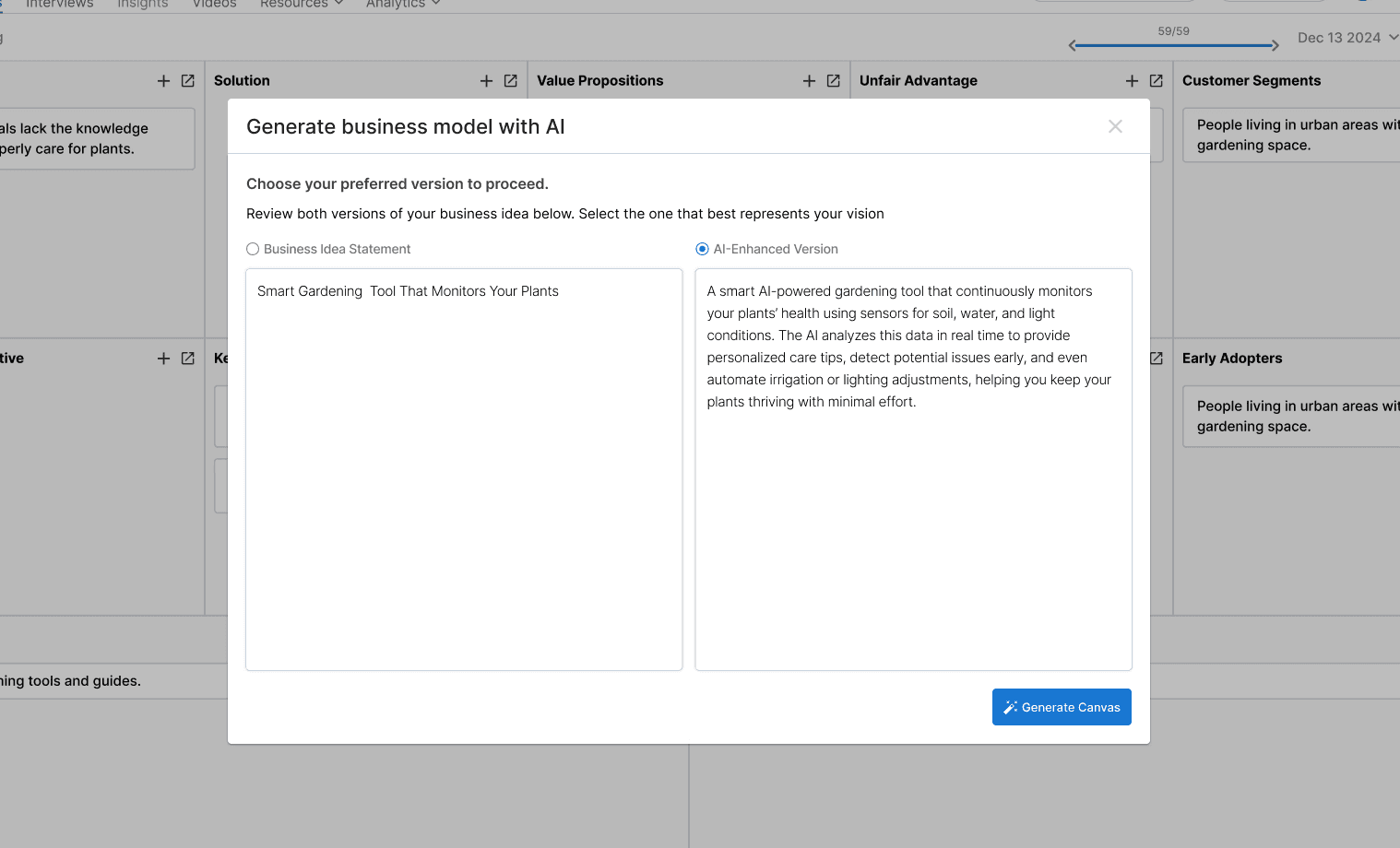
Turn your initial ideas into stronger, more refined business concepts. Our new AI-enhanced feature analyzes your idea and generates an improved version, helping you uncover blind spots and discover fresh opportunities. You can now easily compare the AI’s suggestion with your own and choose the version that aligns best with your vision and goals.
New Features:
AI-Enhanced Business Idea: Save time and boost creativity with AI support that strengthens your business ideas, ensuring your model starts off smarter and more validated.
Side-by-Side Comparison: Instantly view your idea next to the AI-generated one to spot differences, merge insights, and make more confident decisions before finalizing your business model.
Aug 18, 2025
AI-Enhanced Business Idea
Turn your initial ideas into stronger, more refined business concepts. Our new AI-enhanced feature analyzes your idea and generates an improved version, helping you uncover blind spots and discover fresh opportunities. You can now easily compare the AI’s suggestion with your own and choose the version that aligns best with your vision and goals.
New Features:
AI-Enhanced Business Idea: Save time and boost creativity with AI support that strengthens your business ideas, ensuring your model starts off smarter and more validated.
Side-by-Side Comparison: Instantly view your idea next to the AI-generated one to spot differences, merge insights, and make more confident decisions before finalizing your business model.
Aug 18, 2025
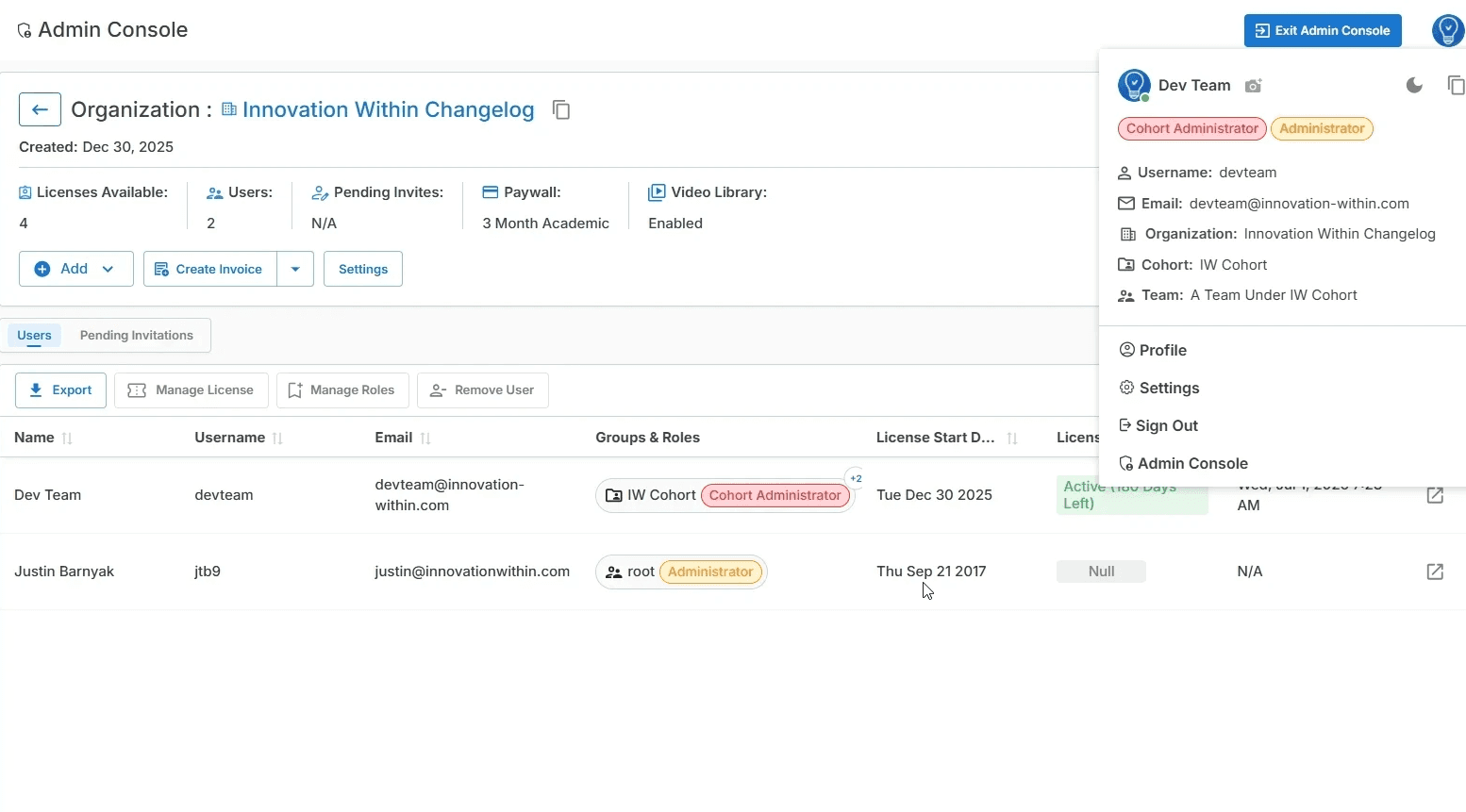
Organization & Administrator Role System (V3)
We’ve introduced a new Organization & Administrator Role System (V3) to give teams clearer structure, stronger governance, and better control over users, licenses, and access. This update establishes a scalable foundation for managing organizations, cohorts, teams, and administrators—without relying on platform-level intervention.
With this release, administrative responsibilities are clearly defined, making it easier to manage growth, permissions, and operations across organizations.
New Features:
Organization-Level Admin Console: A dedicated admin console to manage organizations, users, cohorts, teams, and licenses from one centralized interface.
Administrator & Cohort Administrator Roles: Clearly defined roles allow admins to manage organization-wide settings while Cohort Admins oversee cohort-specific operations and access.
User, Team & Cohort Management: Add users, create teams, assign cohorts, and manage group roles directly from the admin interface.
License & Invoice Management: Create and view invoices, assign licenses, track usage, and monitor license status at the organization and cohort level.
Organization Settings & Paywall Control: Configure paywall plans, manage video library access, and update organization-level settings with full visibility.
Permission-Based Access Control: Ensure users only see and manage what they’re authorized to, improving security and operational clarity.
Aug 18, 2025
Organization & Administrator Role System (V3)
We’ve introduced a new Organization & Administrator Role System (V3) to give teams clearer structure, stronger governance, and better control over users, licenses, and access. This update establishes a scalable foundation for managing organizations, cohorts, teams, and administrators—without relying on platform-level intervention.
With this release, administrative responsibilities are clearly defined, making it easier to manage growth, permissions, and operations across organizations.
New Features:
Organization-Level Admin Console: A dedicated admin console to manage organizations, users, cohorts, teams, and licenses from one centralized interface.
Administrator & Cohort Administrator Roles: Clearly defined roles allow admins to manage organization-wide settings while Cohort Admins oversee cohort-specific operations and access.
User, Team & Cohort Management: Add users, create teams, assign cohorts, and manage group roles directly from the admin interface.
License & Invoice Management: Create and view invoices, assign licenses, track usage, and monitor license status at the organization and cohort level.
Organization Settings & Paywall Control: Configure paywall plans, manage video library access, and update organization-level settings with full visibility.
Permission-Based Access Control: Ensure users only see and manage what they’re authorized to, improving security and operational clarity.
Jul 30, 2025
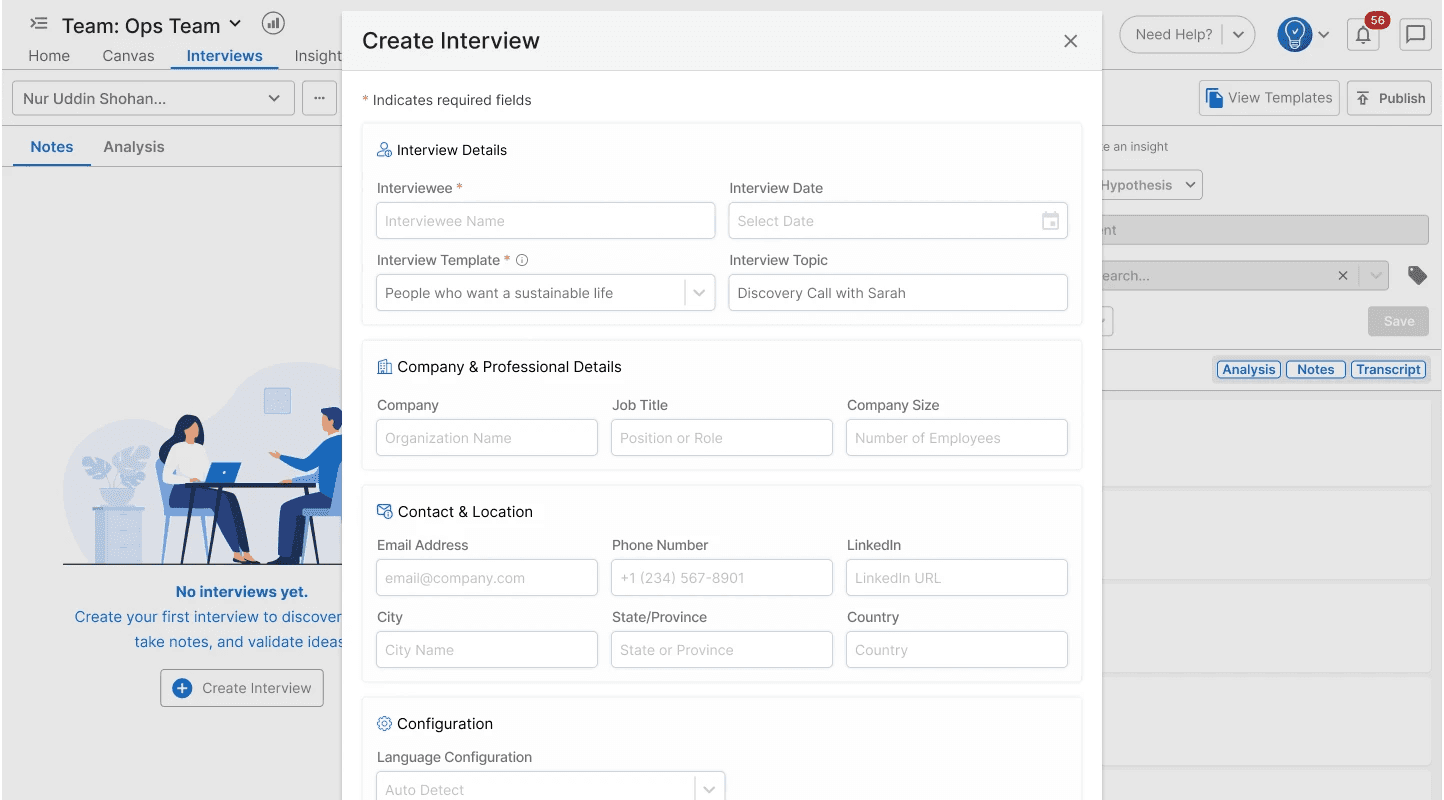
Interview Creation Form Redesign
We’ve modernized the Interview Creation experience with a cleaner, more intuitive form layout that makes it easier to capture the details you need before starting a conversation. This redesign is part of a larger effort to improve all form-based interactions across the platform, bringing a consistent, polished look and smoother usability to every workflow.
The updated design helps you move faster, reduces friction for new users, and ensures every interview is set up with the right context from the start.
New Features:
Redesigned Interview Creation Form: A completely refreshed layout with improved spacing, inputs, and hierarchy—making it easier to fill out interview details quickly and confidently.
Unified Form Styling Across the Platform: All forms now follow the same design language, offering consistency across interviews, canvases, settings, and admin workflows.
Improved Input Organization: Information is now grouped into clear sections (Details, Professional Info, Contact, Configuration) to reduce cognitive load while filling out interviews.
Enhanced Accessibility & Readability: Higher-contrast labels, clearer field grouping, and improved error-state presentation help teams avoid mistakes and onboard faster.
Jul 30, 2025
Interview Creation Form Redesign
We’ve modernized the Interview Creation experience with a cleaner, more intuitive form layout that makes it easier to capture the details you need before starting a conversation. This redesign is part of a larger effort to improve all form-based interactions across the platform, bringing a consistent, polished look and smoother usability to every workflow.
The updated design helps you move faster, reduces friction for new users, and ensures every interview is set up with the right context from the start.
New Features:
Redesigned Interview Creation Form: A completely refreshed layout with improved spacing, inputs, and hierarchy—making it easier to fill out interview details quickly and confidently.
Unified Form Styling Across the Platform: All forms now follow the same design language, offering consistency across interviews, canvases, settings, and admin workflows.
Improved Input Organization: Information is now grouped into clear sections (Details, Professional Info, Contact, Configuration) to reduce cognitive load while filling out interviews.
Enhanced Accessibility & Readability: Higher-contrast labels, clearer field grouping, and improved error-state presentation help teams avoid mistakes and onboard faster.
Jul 25, 2025
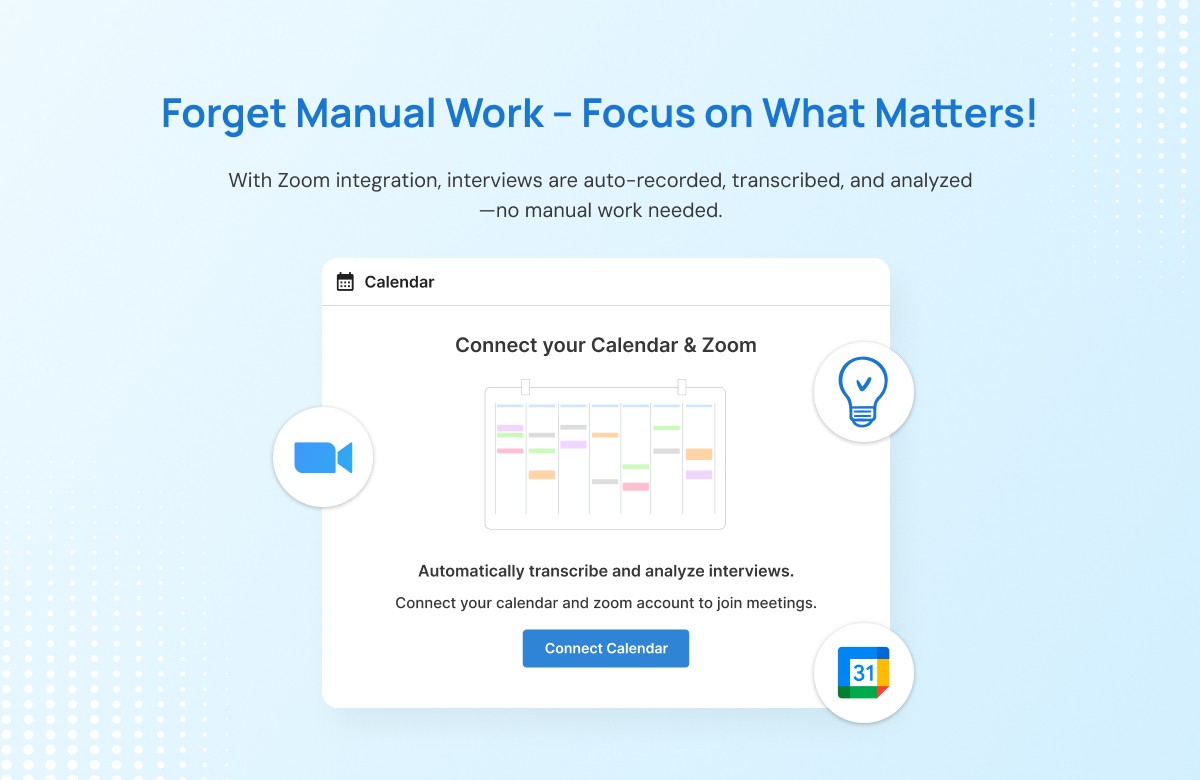
Innovation Within Zoom Integration
We’ve made it even easier to capture and analyze your customer interviews. With our new Zoom Integration, your meetings can now be automatically recorded, transcribed, and analyzed — no uploads or manual work required. Full documentation
New Features:
Automatic Recording & Transcription: Connect your Zoom and Google Calendar accounts to automatically capture scheduled customer interviews. Once your meeting ends, the AI instantly transcribes and processes it.
AI-Powered Meta Analysis: After transcription, Innovation Within automatically generates insights, executive summaries, and thematic analyses — ready for you to review inside your workspace.
Cloud Recording Automation: Simply enable Zoom’s cloud recording; the rest is handled automatically.
All-in-One Workflow: Access every interview, transcript, and insight securely in one place — no switching tools or juggling files.
This integration saves hours of manual work and ensures every conversation contributes directly to refining your business model.
Jul 25, 2025
Innovation Within Zoom Integration
We’ve made it even easier to capture and analyze your customer interviews. With our new Zoom Integration, your meetings can now be automatically recorded, transcribed, and analyzed — no uploads or manual work required. Full documentation
New Features:
Automatic Recording & Transcription: Connect your Zoom and Google Calendar accounts to automatically capture scheduled customer interviews. Once your meeting ends, the AI instantly transcribes and processes it.
AI-Powered Meta Analysis: After transcription, Innovation Within automatically generates insights, executive summaries, and thematic analyses — ready for you to review inside your workspace.
Cloud Recording Automation: Simply enable Zoom’s cloud recording; the rest is handled automatically.
All-in-One Workflow: Access every interview, transcript, and insight securely in one place — no switching tools or juggling files.
This integration saves hours of manual work and ensures every conversation contributes directly to refining your business model.
Jul 23, 2025
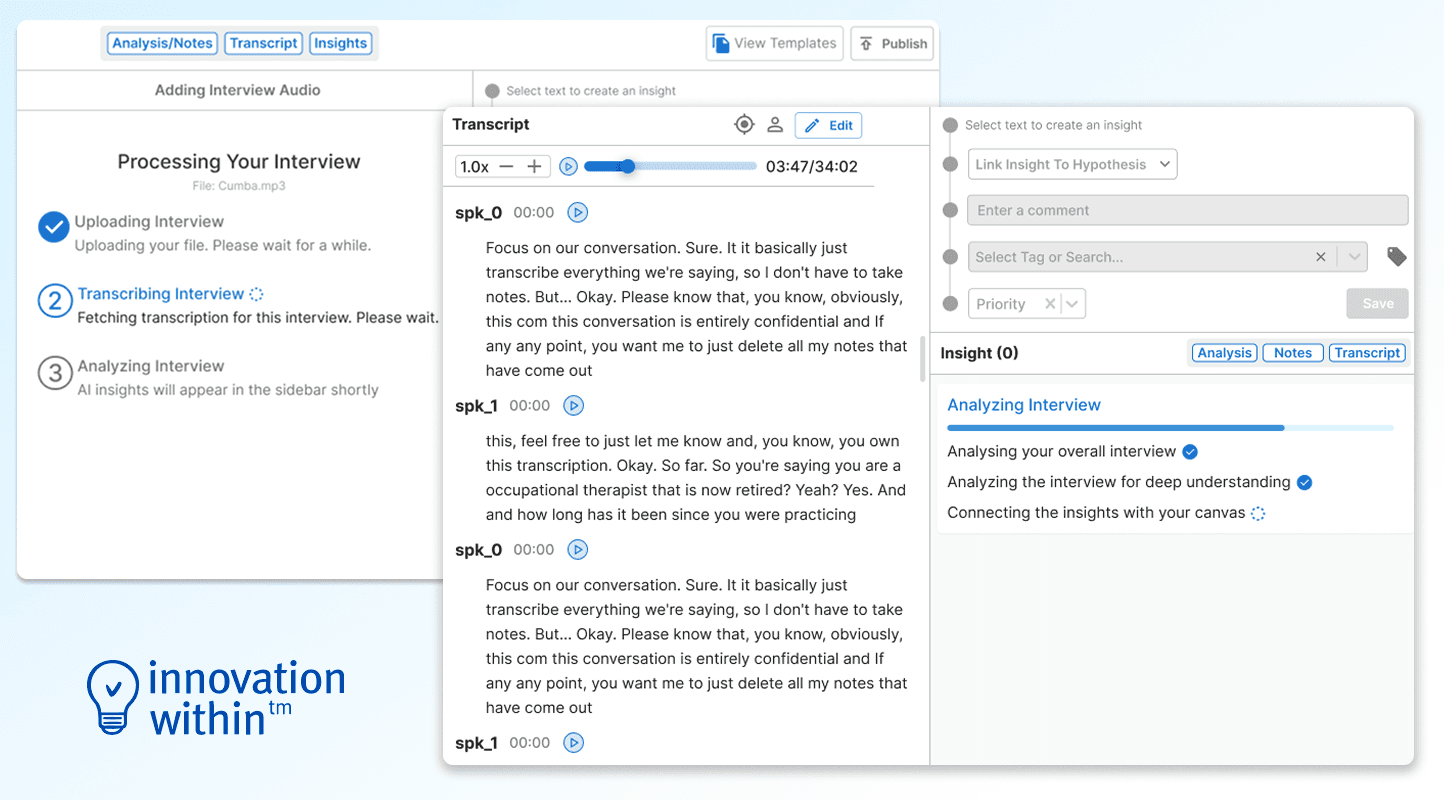
AI Transcript Analysis with Multi-Phase Status Tracking
We’ve introduced a clearer, more reliable way to understand what’s happening behind the scenes when you upload and analyze an interview. The new multi-phase status tracking system gives you real-time visibility into each step of the AI analysis pipeline—uploading, transcribing, and generating insights—so you always know exactly where your interview stands.
Along with this, we’ve strengthened failure handling across all phases. If any step of the pipeline encounters an issue, the system now intelligently recovers or falls back to ensure you still receive the most complete and accurate analysis possible.
New Features:
Three-Phase Analysis Tracking: Every interview now progresses through clearly visible stages—Uploading, Transcribing, and Analyzing—so you can monitor the full journey at a glance.
Enhanced Failure Recovery: If transcription or analysis encounters an error, the system automatically retries or falls back to stable processing paths, ensuring higher reliability and fewer blocked interviews.
Continuous Progress Feedback: Users receive live visual updates throughout the process, eliminating confusion and making the waiting experience transparent and predictable.
Better Insight Availability: As soon as AI analysis completes, new insights appear instantly in the sidebar—no refreshing or manual checks required.
Jul 23, 2025
AI Transcript Analysis with Multi-Phase Status Tracking
We’ve introduced a clearer, more reliable way to understand what’s happening behind the scenes when you upload and analyze an interview. The new multi-phase status tracking system gives you real-time visibility into each step of the AI analysis pipeline—uploading, transcribing, and generating insights—so you always know exactly where your interview stands.
Along with this, we’ve strengthened failure handling across all phases. If any step of the pipeline encounters an issue, the system now intelligently recovers or falls back to ensure you still receive the most complete and accurate analysis possible.
New Features:
Three-Phase Analysis Tracking: Every interview now progresses through clearly visible stages—Uploading, Transcribing, and Analyzing—so you can monitor the full journey at a glance.
Enhanced Failure Recovery: If transcription or analysis encounters an error, the system automatically retries or falls back to stable processing paths, ensuring higher reliability and fewer blocked interviews.
Continuous Progress Feedback: Users receive live visual updates throughout the process, eliminating confusion and making the waiting experience transparent and predictable.
Better Insight Availability: As soon as AI analysis completes, new insights appear instantly in the sidebar—no refreshing or manual checks required.
Jul 20, 2025
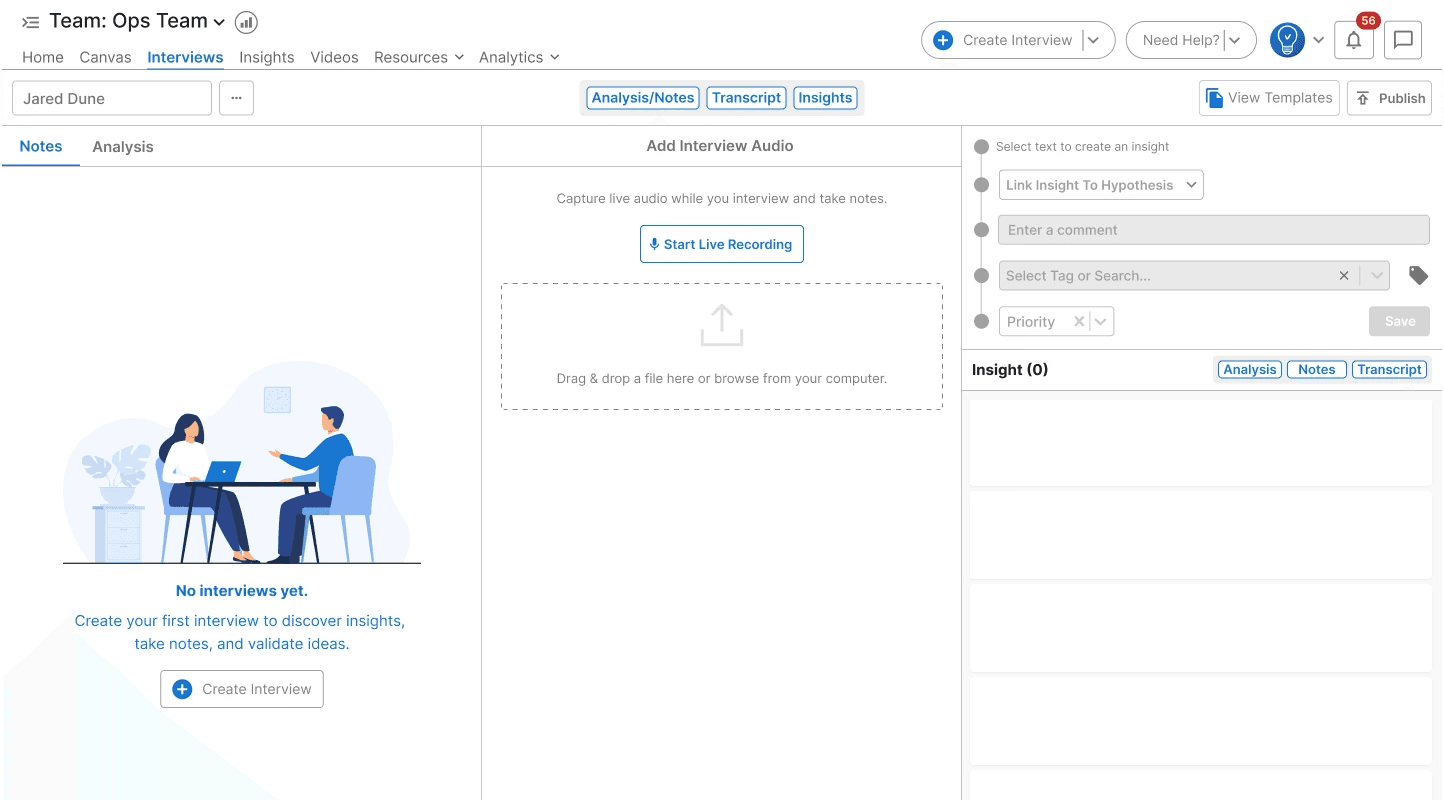
Interview Page Redesign
We’ve redesigned the Interview workspace to give you a cleaner, more focused experience while capturing customer conversations. The new layout introduces collapsible sections and a flexible panel system, allowing you to concentrate on the part of the interview that matters most—whether that’s taking notes, reviewing transcripts, or generating insights.
With this update, accessing your interview template during a live session is now effortless, helping you stay organized and ask better questions without breaking your flow.
New Features:
Collapsible Workspace Sections: Focus on a single mode—Notes, Transcript, Analysis, or Insights—by collapsing the sections you don’t need. This makes the interview interface cleaner and distraction-free.
Flexible Multi-Panel Layout: Easily switch between panels or keep only the ones you need open, giving you complete control over your workflow during interviews.
Improved Template Visibility: The interview template is now easier to access, ensuring you can reference your prepared questions at any moment without switching screens.
Enhanced Empty-State Experience: A refreshed “No Interviews Yet” layout helps new teams get started quickly with a guided CTA.
Jul 20, 2025
Interview Page Redesign
We’ve redesigned the Interview workspace to give you a cleaner, more focused experience while capturing customer conversations. The new layout introduces collapsible sections and a flexible panel system, allowing you to concentrate on the part of the interview that matters most—whether that’s taking notes, reviewing transcripts, or generating insights.
With this update, accessing your interview template during a live session is now effortless, helping you stay organized and ask better questions without breaking your flow.
New Features:
Collapsible Workspace Sections: Focus on a single mode—Notes, Transcript, Analysis, or Insights—by collapsing the sections you don’t need. This makes the interview interface cleaner and distraction-free.
Flexible Multi-Panel Layout: Easily switch between panels or keep only the ones you need open, giving you complete control over your workflow during interviews.
Improved Template Visibility: The interview template is now easier to access, ensuring you can reference your prepared questions at any moment without switching screens.
Enhanced Empty-State Experience: A refreshed “No Interviews Yet” layout helps new teams get started quickly with a guided CTA.
Jul 16, 2025
Meta-Analysis for Interviews
Our latest update takes interview analysis to a whole new level. The new Meta-Analysis feature processes each customer interview through our AI pipeline to deliver deeper, more structured insights that help you make smarter business decisions faster.
New Features:
Comprehensive Meta-Analysis: Each interview is now analyzed across multiple dimensions—Executive Summary, Explicit and Implicit Insights, and Thematic Analysis—to give you a clear, 360° understanding of your customer feedback.
Insight-to-Hypothesis Mapping: Instantly see which hypotheses your interviews support or refute, directly linked to the relevant parts of the meta-analysis. This makes it easier to decide what to prioritize and how to update your Business Model Canvas with confidence.
With this update, you spend less time sorting through transcripts and more time uncovering what truly matters for your innovation.

Jul 16, 2025
Meta-Analysis for Interviews
Our latest update takes interview analysis to a whole new level. The new Meta-Analysis feature processes each customer interview through our AI pipeline to deliver deeper, more structured insights that help you make smarter business decisions faster.
New Features:
Comprehensive Meta-Analysis: Each interview is now analyzed across multiple dimensions—Executive Summary, Explicit and Implicit Insights, and Thematic Analysis—to give you a clear, 360° understanding of your customer feedback.
Insight-to-Hypothesis Mapping: Instantly see which hypotheses your interviews support or refute, directly linked to the relevant parts of the meta-analysis. This makes it easier to decide what to prioritize and how to update your Business Model Canvas with confidence.
With this update, you spend less time sorting through transcripts and more time uncovering what truly matters for your innovation.